ANALYSIS: User Inventory
Kibana Dashboard: [INVENTORY] Users
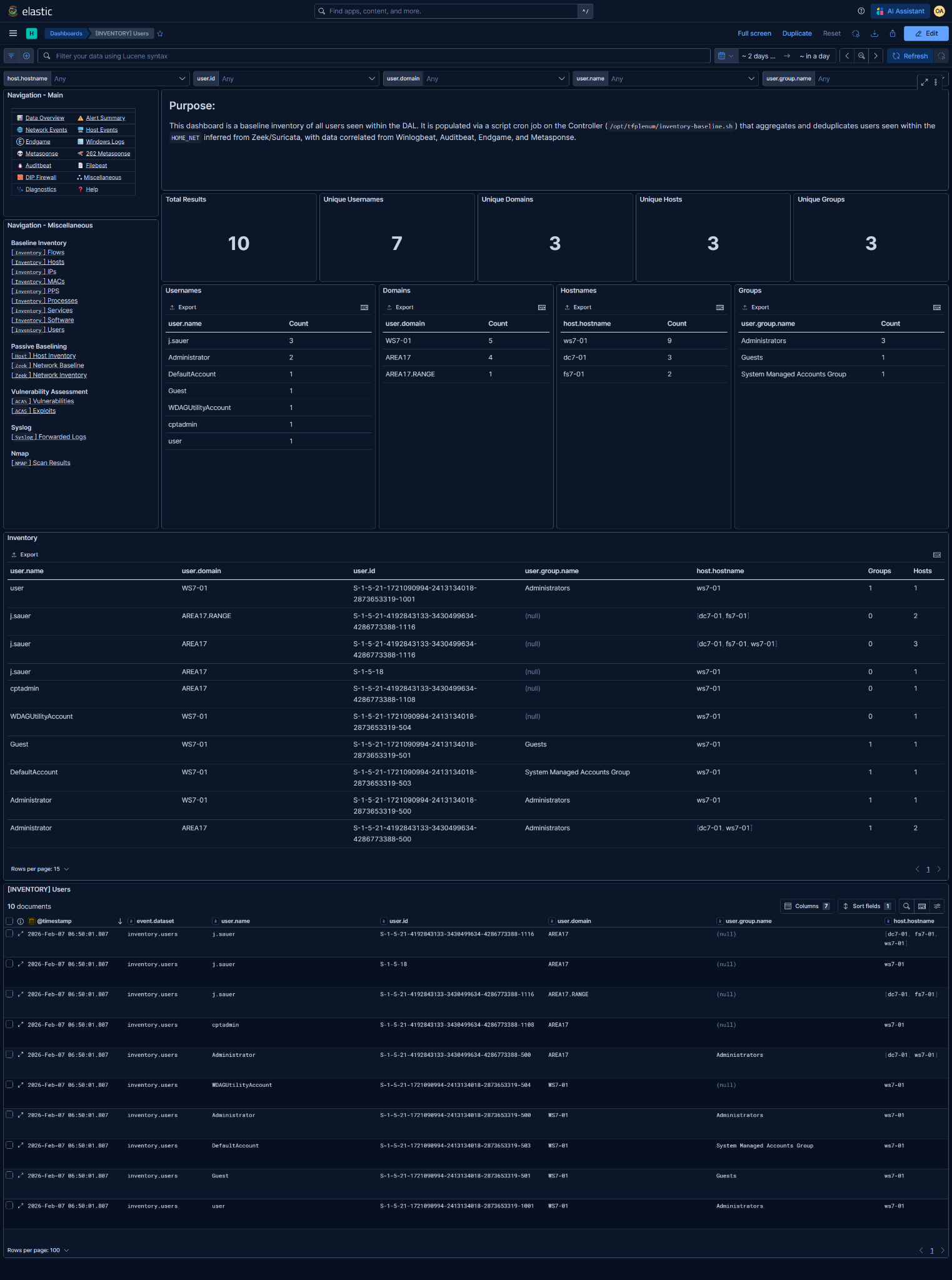
What is this baseline?
The associated Kibana dashboard represents the baseline inventory of user accounts observed within the DAL.
- A user entry consists of:
user.nameuser.domainuser.id- Zero or more associated
user.group.namevalues - One or more associated
host.hostnamevalues
- Each row answers:
"Was this user account observed in the baseline inventory?"
- This is not an authentication or identity management system:
- No login success/failure tracking
- No session duration or activity timelines
- No guarantee the account is currently enabled
- A single corroborated observation is sufficient to add a user to the baseline.
- Entries are deduplicated by this tuple:
user.nameuser.domainuser.id(SID when available)
- Users are added when observed on hosts within the DAL
- Group membership is recorded when available
@timestampreflects when the user was last observed and written into the baseline
Data Prerequisites
If any of these are missing or incorrect, the baseline is unreliable.
1. DAL / HOME_NET must be correct
- Derived from Zeek and/or Suricata
HOME_NET - Used to scope which hosts to use user data from
- Incorrect DAL → missing users or misattributed accounts
2. Required telemetry sources (at least one)
- Winlogbeat Security (logon and account events)
- Auditbeat (
user) - Endgame (user context)
- Metasponse
Accounts Collector262 - [💾Persistence] User Accounts
NOTE: User visibility is telemetry-driven.
Sparse endpoint logging will result in incomplete user inventories.
Basic Analysis Workflow
1. Baseline sanity check
Validate expected account population:
- Known local and domain users are present
- Expected service accounts appear
- Domain distribution aligns with mission architecture
- Built-in accounts (
Administrator,Guest,DefaultAccount) behave as expected
Unexpected absences usually indicate missing telemetry, not stealth.
2. Long-tail analysis (primary value)
Focus on unaccounted or unexpected users
- Users observed on only a single host
- Accounts with ambiguous or generic names
Key questions
- Legitimate service or application account?
- Temporary admin or mission-support account?
- Renamed or legacy account?
- Unauthorized or rogue user?
Validate against:
- Account management documentation
- Expected service account lists
- Administrator confirmation if required
3. Group and host correlation review
Privileged group membership
- Pay close attention to:
Administrators- Domain admin–equivalent groups
- Unexpected membership warrants investigation
Users across multiple hosts
- Normal for domain users
- Suspicious if the account is not expected to be mobile
Context matters more than the username itself.
4. Export for reporting and diffing
Reporting and documentation requirements are determined by the Mission Element Lead/Crew Lead
Common exports
- Full Inventory table (CSV)
- User ↔ host mapping
- Privileged group membership list
NOTE: These exports represent the declared user baseline for the mission period.
5. Enable baseline deviation detection rule
Enabling too early guarantees noise - it will alert on ALL new inventory additions after enablement.
Detection rules can be managed in Kibana under Security → Rules
Rule: [262][Inventory] New user added to baseline
- Detection logic:
Alert when a new user account within the DAL is added to the baseline inventory
- Only enable after:
- Baseline window is complete
- Expected users and service accounts are observed
- Long-tail user review is finished
- Ongoing alert tuning:
- Whitelist expected service and application accounts
- Suppress known provisioning activity
- Validate whether the account represents new access or expected change
This rule is intended to catch:
- Unauthorized account creation
- Rogue local users
- Unexpected reintroduction of dormant accounts